

How to Log into a Purchased Gmail Account via Recovery Email: A Guide from Stockrush
Hi! The Stockrush marketplace team is constantly working to make your digital goods shopping experience as comfortable as possible. We have created a truly convenient and secure service for transactions, but sometimes the security systems of email providers themselves can be a bit stressful for users.
In 2026, Google’s algorithms monitor logins from new devices or unusual IP addresses very strictly. Therefore, when purchasing a Gmail account, you might encounter an additional verification step. Here is a simple explanation of how to pass it in just a couple of clicks.
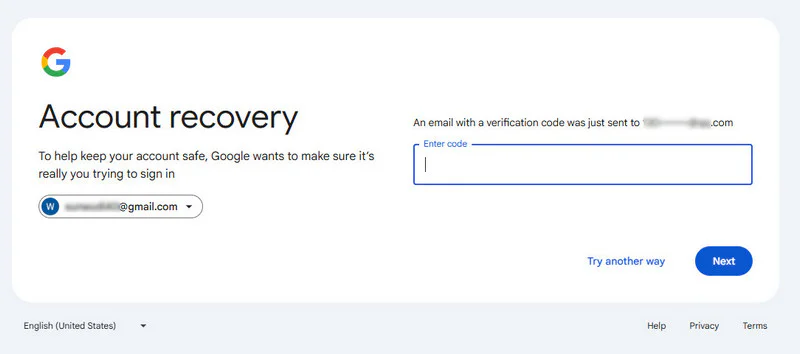
The Secret of the "Confirm recovery mail" Option
Often, after purchasing, you receive a text file from the seller containing the login, password, and an additional recovery email address. A logical question arises: where is the password for this second email?
Spoiler: You simply don't need it.
Google is not asking you to log into that recovery email. The algorithm only needs to verify that you know the full address. The process is very simple:
- Enter the login and password for the purchased Gmail account.
- When the security system stops you and offers identity verification options, click on "Confirm recovery mail."
- A blank field will appear. Simply copy the recovery email address from the file you received when purchasing on Stockrush and paste it there.
- Click the confirmation button, and access will be granted.
A Clean Market and Your Security
At Stockrush, we are building a fair platform and advocate exclusively for a legal market. We categorically condemn scams, fakes, and the sale of hacked data. Our goal is transparent business. By buying from us, you receive reliable support. Be sure to read.
To ensure your purchases are always successful, we recommend studying our material on.
And if you realize you have high-quality digital goods and want to earn from them, join our community of sellers. We have a great article with.
Use quality services, buy safely, and grow your projects with Stockrush!
Find it in the catalog
Related Posts
What Is a PVA Account: Phone Verification, Explained for Buyers
PVA means phone verified account. Learn what the phone check proves, how it differs from email-only and self-reg accounts, and the risks of a foreign number.
Residential vs Mobile Proxies: Price, Stability and Which Job Needs What
Residential vs mobile proxies compared by price, stability, platform trust and typical tasks. A short comparison table and a clear pick for each job follow.
Proxy Setup Checklist Before the First Login to a Purchased Account
A step-by-step proxy setup for accounts: check country and type, close DNS and WebRTC leaks, match timezone and language, and only then make the first login.